


Best Email Analytics Software for Team Productivity
Quick Summary
- Your inbox already holds the data you need to see how your team's doing.
- Start with reply times, since slow replies often point to an overloaded teammate.
- Pick a tool that reads email headers only, so nobody's messages get opened.
Best Email Analytics Software to Track Team Productivity
The best email analytics software for tracking team performance includes timetoreply, EmailAnalytics, Email Meter, Hiver, and Front.
Each one shows how fast your team replies and who's carrying too much work. You might notice a deal stalled, but your inbox won't tell you why. These tools pull that answer from data your team already creates every day.
Below, you'll see what each tool does well, where it falls short, and what it costs.
What Is Email Analytics Software?
Email analytics software measures how your team handles email, from reply speed to daily workload. It pulls first reply time, email volume, and SLA breaches from Gmail or Outlook.
If you run data-driven marketing, you know campaign tools report opens and clicks. Team email analytics, or email communication analytics, tracks how quickly your people answer clients.
For context, Microsoft's 2025 Work Trend Index found that the average worker receives 117 emails a day. At that volume, slow client replies are easy to miss. Email performance tracking flags those slow replies before clients start to complain.
What Does Email Analytics Software Show You?
Email analytics software shows how quickly your team replies and how much email each person handles. It helps you catch delays that busy inboxes hide.
How Did We Choose the Best Email Analytics Software?
We picked each tool based on how well it tracks your team's reply speed and workload. We judged each one against the same criteria:
- Response Time Depth: It should show first reply time, average reply time, and SLA results
- Shared Mailbox Support: It should track team inboxes like support@ as well as personal ones
- Platform Coverage: It should work with Gmail, Outlook, or both, without changing your workflow
- Privacy: It should be clear about what data it reads, ideally email headers only
- Fair Pricing: It should charge in a way that suits your team's size
What Should You Look for in Email Analytics Software?
Look for email analytics software that tracks reply times and SLAs across personal and shared inboxes. It should also fit your email platform and budget.
How Do These Email Analytics Software Tools Compare?
For SLA tracking, timetoreply leads, while the others trade depth for lower prices or inbox features. Here's how they compare side by side:
| Tool | Best For | Starting Price | Free Plan or Trial | G2 Rating |
|---|---|---|---|---|
| timetoreply | SLA tracking for client teams | $44/mailbox/month | 14-day trial | 4.2/5 |
| EmailAnalytics | Simple reply-time dashboards | $19/inbox/month | 14-day trial | 4.5/5 |
| Email Meter | Free email statistics | $19/user/month | Free plan | 4.1/5 |
| Hiver | Shared inboxes in Gmail | $35/user/month | 7-day trial | 4.6/5 |
| Front | Large customer service teams | $25/seat/month, billed annually | 14-day trial | 4.6/5 |
Prices verified as of October 2026
Which Email Analytics Tool Is Best for Your Team?
The best email analytics tool depends on your team size and how many inboxes you track. For larger customer-facing teams, timetoreply is a strong pick. Smaller teams can save with EmailAnalytics or Email Meter.
What Are the 5 Best Email Analytics Software Tools for Teams?
The 5 best email analytics software tools for teams are timetoreply, EmailAnalytics, Email Meter, Hiver, and Front. Each one handles email performance analytics differently, so match the tool to your main problem.
1. timetoreply
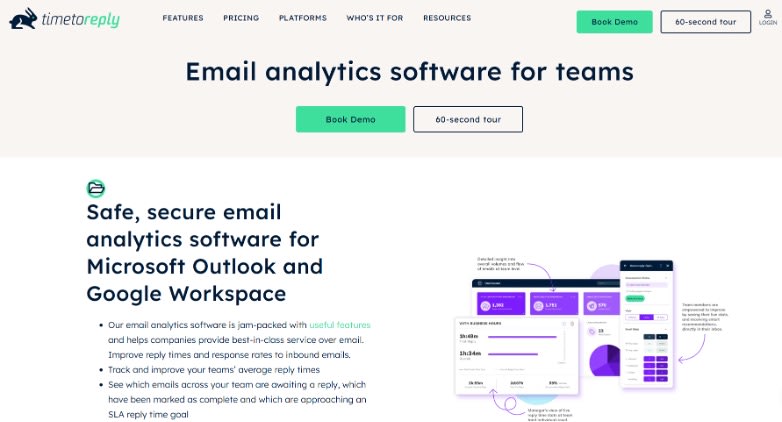
With timetoreply, agents can mark threads as closed right inside Outlook or Gmail. So you can see which emails still need a reply and which are done. This email analytics software also tracks how quickly your suppliers reply.
Ontellus says its company-wide responsiveness rose from 62% to 86% after using it.
Key Features
- Set SLA goals, like a reply within eight business hours, and get alerts before breaches
- Track shared mailboxes, group mailboxes, and distribution lists, plus each agent's share of the work
Pros
- Your team keeps working in Outlook or Gmail, so there's no new inbox to learn
- Managers can spot at-risk accounts early, before slow replies turn into complaints
Cons
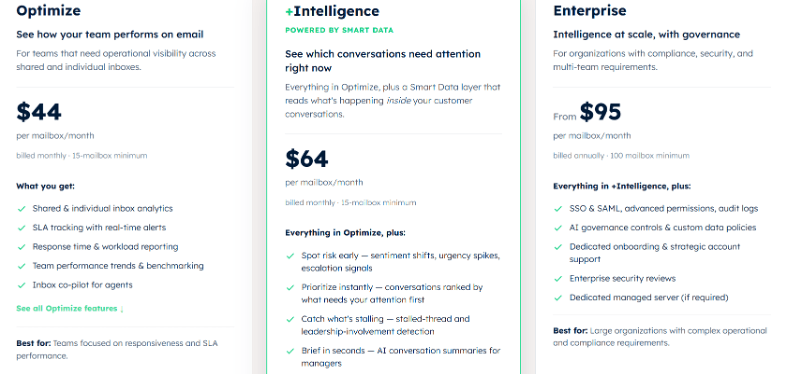
- The 15-mailbox minimum makes it expensive for very small teams
- To see each agent's stats within a shared inbox, you also pay for their personal mailbox
Pricing
- Optimize: $44/mailbox/month
- +Intelligence: $64/mailbox/month
- Enterprise: From $95/mailbox/month (billed annually)
Tool Level: Intermediate
2. EmailAnalytics
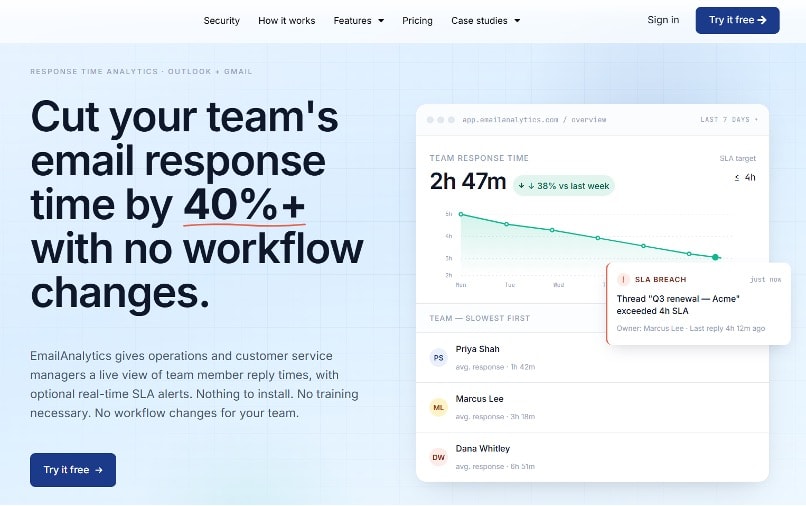
EmailAnalytics connects to Gmail and Outlook through their APIs, so there's no add-in to install. This email analytics software gives small teams simple email productivity analytics without a new inbox.
It pulls in up to two years of history, so your baseline starts on day one. Sales managers can also see how fast reps answer leads from online lead generation campaigns.
Key Features
- See average response time by rep, day of the week, and hour of the day
- Track Outlook shared mailboxes at both the queue level and the agent level
Pros
- Data shows up about a minute after you connect, so there's no long onboarding
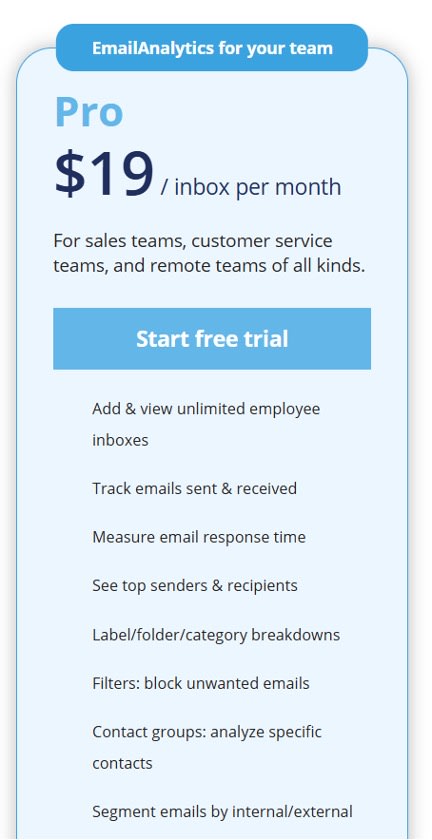
- There's no minimum inbox count, so even a two-person team can sign up
Cons
- It doesn't track opens or clicks, so you'll need a separate tool for that
- Real-time SLA alerts and sentiment analysis come only with the paid AI add-on
Pricing
- Pro: $19/inbox/month
Tool Level: Beginner
3. Email Meter
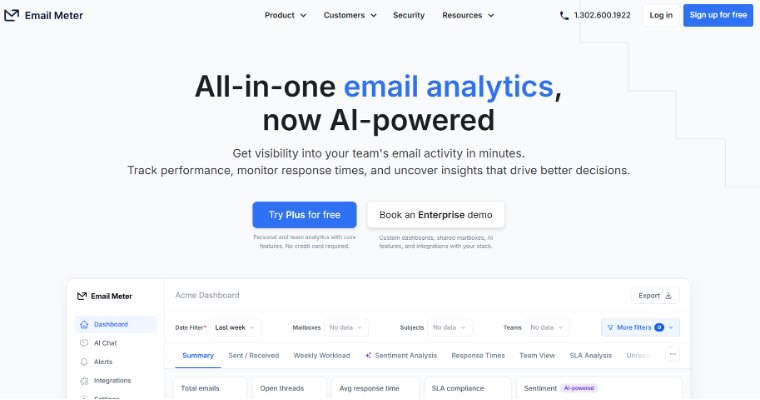
Email Meter is an email analytics software that sends weekly and monthly reports on your team's email. It only reads email headers, so managers get reply and volume data without seeing message content.
Start on the free plan, then move to Plus when you need team reports.
Key Features
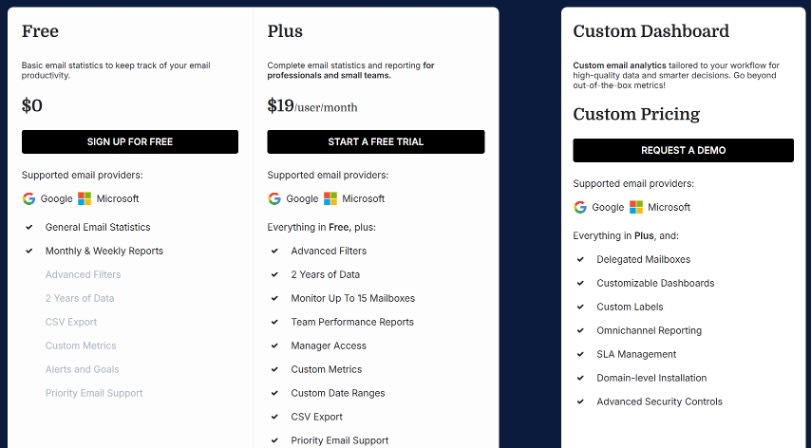
- Track up to 15 mailboxes on Plus, with team performance reports and manager access
- Pick custom date ranges and export any report to CSV
Pros
- Header-only access makes it easier to get sign-off from IT and legal teams
- Its Plus plan keeps two years of data, so you can compare busy seasons year over year
Cons
- The free plan only keeps the last month of data, which limits trend tracking
- Shared mailbox views and SLA management need the Custom Dashboard plan
Pricing
- Free: With basic email statistics
- Plus: $19/user/month
- Custom Dashboard: Custom pricing
Tool Level: Beginner
4. Hiver
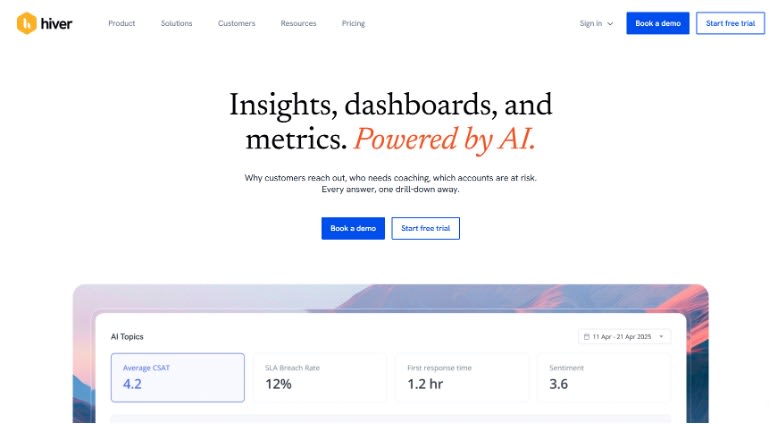
Hiver combines email analytics software with a shared inbox for teams in Gmail. It turns addresses like support@ into tickets, so each email gets a clear owner. Its email management analytics then show who's handling what.
Its rules can also assign emails on a round-robin basis, so work spreads evenly across your team. It works much like other automation tools that take repeat tasks off your plate.
Key Features
- Run it inside Gmail or use Hiver Omni, which also connects Outlook and other providers
- Build custom reports and dashboards on SLAs, tags, and individual users on Pro
Pros
- Gmail teams handle shared inboxes without leaving the inbox they already use
- Pro connects with team productivity tools like Asana, Jira, and Shopify
Cons
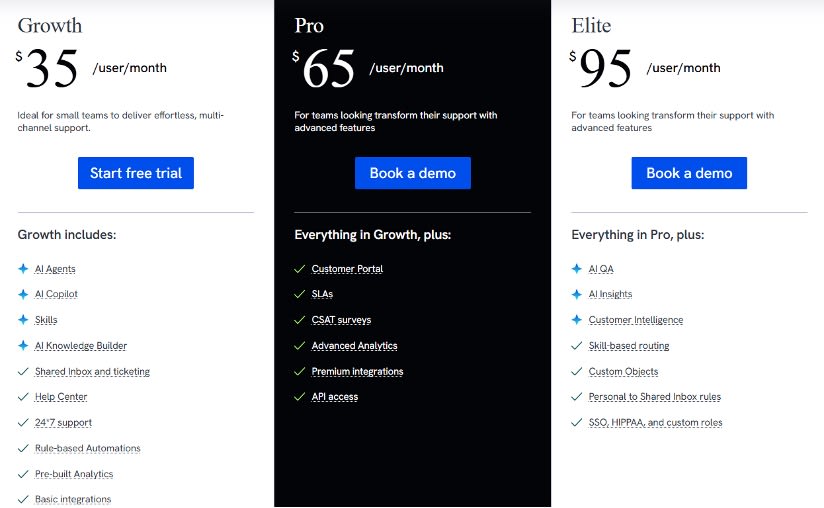
- SLA tracking and custom reports start on Pro, at $65 per user monthly
- After five seats, you buy in blocks of five, so some may go unused
Pricing
- Growth: $35/user/month
- Pro: $65/user/month
- Elite: $95/user/month
Tool Level: Intermediate
5. Front
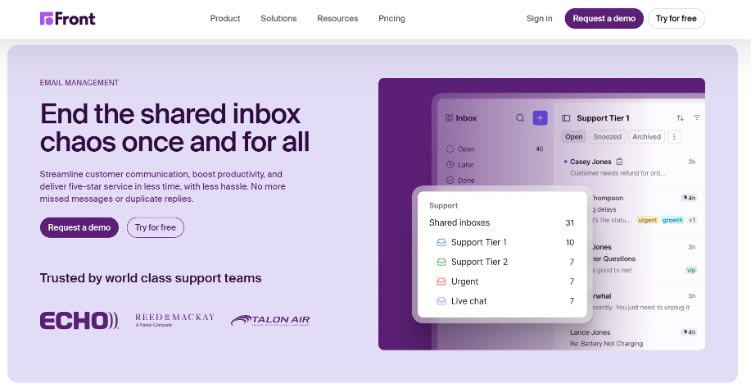
Front brings email, SMS, WhatsApp, and live chat into one shared workspace. Its business email analytics then track workload, reply time, and customer satisfaction across every channel.
With rules, Front can send each email to the right teammate as soon as it arrives. That way, inbound leads reach a salesperson faster. Quick replies can help you reach a good conversion rate.
Key Features
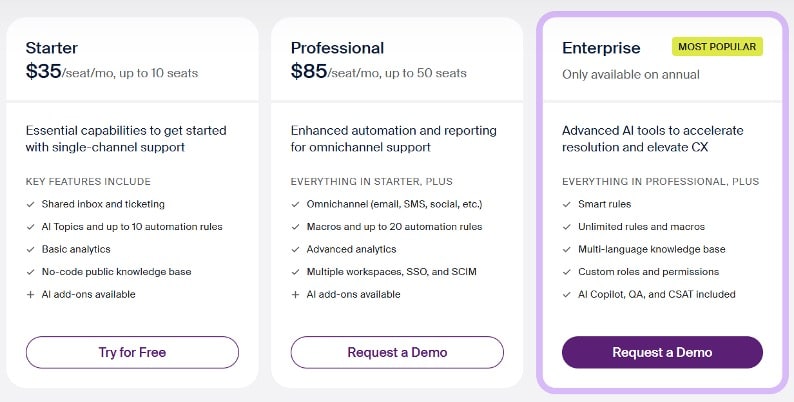
- Route emails with a no-code rules engine, up to 20 rules on Professional
- Build live dashboards and schedule reports on the Professional plan
Pros
- You can add channels and up to five workspaces on Professional as volume grows
- Over 100 integrations connect Front to the CRM and tools you already use
Cons
- Starter includes only basic analytics and one channel type, such as email only
- AI tools like Copilot cost an extra $20 per seat below the Enterprise plan
Pricing
- Starter: $35/seat/month
- Professional: $85/seat/month
- Enterprise: $105/seat/month (annual billing only)
Tool Level: Advanced
How Do You Pick the Right Tool From This List?
Pick the tool that fixes your biggest email problem first. For SLA tracking, timetoreply is the strongest choice. Small teams can save with EmailAnalytics or Email Meter, while Hiver and Front suit shared inboxes.
FAQ
1. What metrics should email analytics tools track?
Email analytics tools should track first reply time, average reply time, email volume, and SLA breaches. Together, these show how fast your team responds and who's overloaded.
2. How is email analytics different from email tracking software?
Email tracking software tells you when someone opens an email you sent. Email analytics looks at your whole team and measures reply speed and workload across every inbox.
3. Is email analytics the same as email productivity software?
No, email productivity software helps one person manage their own inbox faster. Email analytics measures how a whole team handles email.
4. Can email analytics software read my emails?
Some email analytics software reads only headers, such as sender, date, and subject line. Email Meter and timetoreply's Optimize plan work this way, while Hiver and Front handle full messages.
5. What is a good email response time for business teams?
A good response time is one your clients find fair, such as the same business day. Email response time analytics then show how often your team meets that goal.
6. How much does email analytics software cost?
Email analytics software costs anywhere from free to over $100 per seat each month.
7. Can email analytics help measure employee productivity?
Yes, team email analytics feeds employee productivity analytics by showing each person's email load.
8. Is there free email reporting software?
Yes, Email Meter offers free email reporting software with basic email statistics. Most other tools on this list offer free trials.
Which Email Analytics Software Should You Choose?
For most client-facing teams, timetoreply is the best email analytics software. Its SLA alerts and shared mailbox tracking help you catch slow replies early.
If budget is tight, EmailAnalytics or Email Meter will cover the basics. Teams that also need a shared inbox should look at Hiver or Front.
Whichever tool you choose, start small. Track first reply time for a month, then look for the inboxes falling behind. Fix those first, and add more metrics once the basics improve.
Want to turn that data into a stronger digital strategy? Talk to AAMAX's digital experts to help you find where your business can grow next.
Want to publish a guest post on aamax.co?
Place an order for a guest post or link insertion today.
Place an Order