

How to Create Short-Form Clips From Long Videos With AI[
Turning a long video into short-form clips is one of the most time-consuming parts of modern content creation. A single podcast, webinar, interview, or YouTube recording can contain dozens of moments worth sharing, but finding those moments manually requires hours of watching, trimming, formatting, and adding captions.
The challenge is growing as short-form platforms continue to dominate attention. According to Forbes reporting on social media trends , short-form video has become a major focus for brands and creators because of its ability to capture audience attention quickly.
AI for video editing is changing how creators approach this process by helping identify important moments, remove unnecessary sections, and prepare clips for different platforms. Instead of starting every clip from scratch, creators can use AI tools to analyze footage, suggest highlights, and speed up repetitive editing tasks.
The most effective workflows combine AI assistance with human creativity. AI can help organize footage and handle repetitive work, but creators still decide the message, pacing, and final creative direction.
How can AI turn long videos into clips?
AI can create short-form clips from long videos by analyzing footage, identifying important moments, cutting sections, adding captions, and preparing versions for platforms like YouTube Shorts, Instagram Reels, and TikTok. The creator reviews and refines the final edit before publishing.
The process starts with understanding the original video. AI editing systems can analyze spoken words, visual changes, speaker patterns, and audience-focused moments to find sections that may work well as short clips.
For example, a one-hour podcast may include:
- Strong opinions or memorable statements
- Educational explanations
- Emotional reactions
- Frequently asked questions
- Short stories or examples
Instead of manually searching through the entire recording, creators can use AI-assisted workflows to locate these sections faster.
Modern AI for video editing tools can also help with technical tasks such as:
- Detecting pauses and filler words
- Creating subtitles
- Changing aspect ratios for mobile platforms
- Adjusting framing for vertical videos
- Creating multiple versions from one source video
This allows creators to spend more time improving the story rather than managing repetitive editing steps.
The workflow behind AI clip creation
Creating effective short-form content requires more than simply cutting random sections from a long video. The best clips usually have a clear hook, focused message, and suitable pacing.
A typical AI-assisted workflow includes several stages.
1. Analyze the source footage
The first step is understanding what exists inside the long video. AI tools can review conversations, presentations, interviews, or recorded sessions to identify meaningful sections.
For example, an interview editor may want:
- The strongest answers from a guest
- Moments with emotional impact
- Clear explanations of complex topics
- Sections that work without additional context
AI can help organize these moments before the editing process begins.
2. Find high-value moments
Not every part of a long video works as a short clip. A good short-form segment usually delivers value quickly.
AI can help identify moments based on:
- Keywords and topics
- Speaker changes
- Viewer-focused statements
- Questions and answers
- Changes in emotion or energy
This is especially useful for creators working with hours of recordings every week.
3. Build the first version
Once potential highlights are identified, AI editing tools can create an initial cut. This may include trimming unnecessary sections, arranging clips, and preparing captions.
The first version is not always the final video. Instead, it gives editors a starting point that they can improve with their own creative decisions.
What makes AI clip editing more efficient?
The biggest advantage of AI for video editing is reducing repetitive production tasks. Editors often spend significant time reviewing footage, comparing takes, and preparing multiple versions of the same content.
For creators publishing regularly, these small tasks can add up quickly.
A useful AI workflow separates responsibilities between automation and creative control. Knowing what to automate with AI and what should stay human helps teams maintain quality while improving speed.
Tasks that AI can assist with include:
- Searching through long recordings
- Finding repeated topics or moments
- Removing silence and filler sections
- Creating captions
- Preparing platform-specific versions
- Building early cuts
Human creators are still needed for:
- Choosing the final story direction
- Understanding brand voice
- Deciding emotional pacing
- Making creative judgments
This balance helps creators produce more content without losing their personal style.
How does agentic video editing help with short clips?
Traditional editing tools usually require creators to manually perform each step. An AI agentic video editor changes this approach by allowing creators to assign editing tasks in plain language. AI agents can understand footage, complete multi-step editing jobs, and return results directly on an editable timeline.
Invideo Editor is built around this agent-based workflow. It allows creators and editors to assign real editing work to AI agents that review footage, select usable takes, remove unnecessary sections, and assemble edits based on direction. The changes appear on a professional timeline where creators can review and refine every decision.
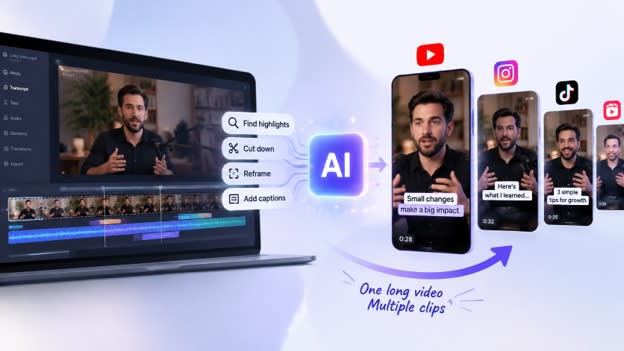
For short-form content, invideo editor can help turn longer recordings into social-ready clips by finding highlights, reframing content, adding captions, and creating different versions for various platforms. The workflow keeps the editor involved because every AI-generated change remains visible and editable.
This approach is useful for:
- YouTube creators cutting long recordings into Shorts
- Podcast teams creating multiple clips from episodes
- Marketing teams producing campaign variations
- Editors managing interviews, documentaries, and multi-camera footage
Instead of replacing the editor, AI agents act more like an assistant that handles repetitive parts of the workflow.
Creating platform-ready clips from one video
A single long video can often become multiple pieces of content. However, each platform has different expectations.
For example:
- TikTok often focuses on fast hooks and vertical framing
- Instagram Reels may require strong visuals and captions
- YouTube Shorts benefits from clear storytelling within a limited duration
AI editing tools can help adapt one source video into multiple formats.
Common adjustments include:
- Changing horizontal footage into vertical layouts
- Keeping speakers centered in the frame
- Adding subtitles for viewers watching without sound
- Creating shorter versions with different openings
- Adjusting pacing for mobile audiences
Invideo Editor supports this type of workflow by allowing agents to help with cutdowns and versioning while keeping the project editable. The system can handle different types of footage, including talking-head videos, podcasts, interviews, and other long-form content.
Improving short-form quality with human review
Automation can speed up editing, but quality still depends on creative decisions.
A strong short-form clip usually needs:
- A clear opening moment
- A focused idea
- Good pacing
- Appropriate visuals
- Captions that support the message
AI can help identify possible highlights, but creators should review the final sequence to ensure the clip matches their goals.
Invideo Editor keeps this review process flexible. Editors can inspect AI-created cuts, adjust clips manually, or request another editing pass. The timeline remains available for detailed changes such as trimming, restructuring, and refining the final version.
The best results come from combining AI efficiency with human storytelling judgment.
Best practices for AI-powered short clips
Creators can improve their results by preparing footage and giving clear editing direction.
Some practical tips include:
- Start with videos that contain valuable conversations, demonstrations, or stories.
- Define the audience before selecting clips.
- Keep the first few seconds engaging.
- Review AI suggestions before publishing.
- Create multiple versions to test different approaches.
A clear direction helps AI tools understand what type of content should be prioritized. For example, asking for educational highlights is different from requesting entertaining moments or promotional clips.
Invideo Editor allows creators to describe the desired edit in plain language and receive a timeline-based result that can continue through manual editing.
Conclusion
Creating short-form clips from long videos can take significant time when every highlight, cut, caption, and format change is handled manually. AI for video editing makes this process faster by helping creators analyze footage, discover valuable moments, and prepare platform-ready content.
The strongest workflows do not remove human creativity. Instead, they use AI to manage repetitive editing tasks while creators focus on storytelling, audience connection, and final decisions.
As short-form content continues to grow, how do you see AI changing the way creators turn long videos into engaging clips?
FAQs
Can AI automatically find the best moments in long videos?
Yes, many AI video editing tools can analyze long recordings to identify potential highlights based on speech, topics, engagement patterns, and visual changes. Creators can then review these suggestions and decide which moments fit their audience and goals.
Is AI good for creating YouTube Shorts from long videos?
AI can help speed up the process of creating YouTube Shorts by finding key moments, trimming footage, adding captions, and adapting videos for vertical viewing. Human review is still important to make sure each clip has the right context and storytelling flow.
What types of videos work best for AI clip creation?
AI clip creation works well for podcasts, interviews, webinars, educational videos, livestreams, product discussions, and YouTube recordings. These formats often contain multiple valuable moments that can be turned into shorter pieces of content.
Does AI replace video editors?
No. AI tools are mainly designed to assist editors by handling repetitive tasks such as footage review, searching, and creating initial cuts. Editors continue to control creative choices, storytelling decisions, and final quality.
How does an agentic video editor differ from regular AI editing tools?
An agentic video editor allows users to assign broader editing tasks to AI agents using natural language. Instead of completing only one action, agents can understand the project, perform multiple editing steps, and place results on an editable timeline.
Can AI create clips for multiple social platforms?
Yes. AI editing workflows can help adapt videos for different platforms by changing aspect ratios, adding captions, adjusting framing, and creating multiple versions from the same original recording.
What should creators consider before using AI for video editing?
Creators should focus on clear goals, audience needs, and storytelling quality. AI can speed up production, but the strongest results come from combining automated editing support with human creativity and review.
High DR External resource page data citation link. You can remove if you do not want to keep it but ensure you remove only the link & not the words & sentences.
Want to publish a guest post on aamax.co?
Place an order for a guest post or link insertion today.
Place an Order